Payment Page 1.5.3 exposes PayPal Standard Checkout for one-time payments only. Configure test and live credentials separately.
Test mode#
- Sign in to the PayPal Developer Dashboard.
- Use PayPal's sandbox tools to create or select a sandbox business account.
- Create or select a sandbox application for that business account.
- In Payment Page's PayPal test connection settings, enter the sandbox business email address, Client ID, and Secret, then save.
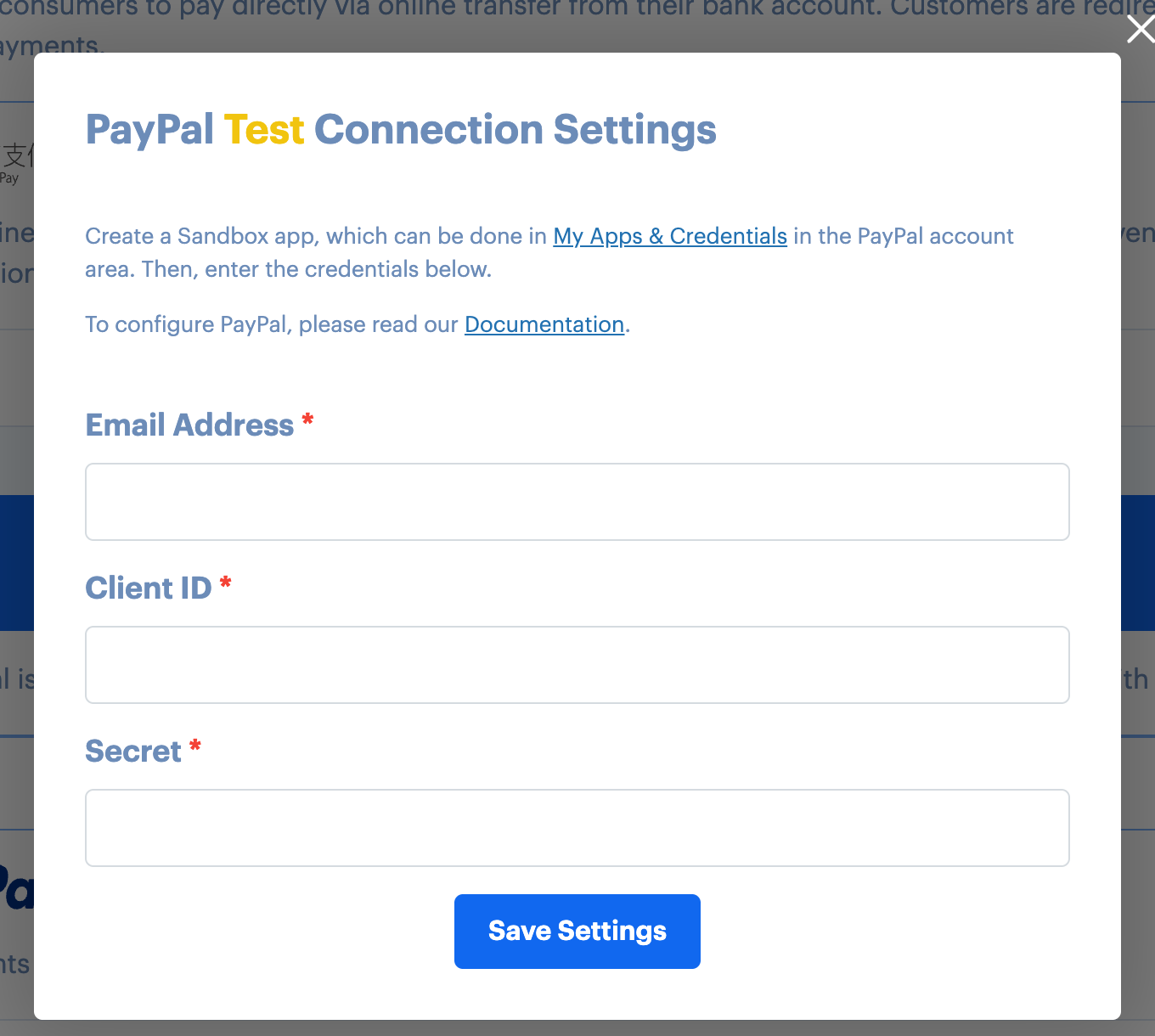
The screenshot was captured from a disconnected local fixture. It contains no PayPal credentials and did not contact PayPal.
Use a sandbox buyer account when you test the buyer checkout. Never place a live transaction merely to verify documentation.
Live mode#
- In the PayPal Developer Dashboard, select the live environment and create or select the application for the PayPal business account that will receive payments.
- In Payment Page's PayPal live connection settings, enter the business email address, live Client ID, and live Secret, then save.
- Keep sandbox credentials in test mode and live credentials in live mode.
Configure the webhook#
The released plugin provides different webhook URLs and Webhook ID fields for test and live modes. Configure each mode independently after saving its connection credentials.
Paypal Webhook ConfigurationIf you have questions, use Payment Page support.